

I Built an AI That Works While I Sleep
How I turned a $20/month open-source tool into a robot employee that runs half my business


I woke up this morning to 47 notifications.
Not emails.
Not Slack messages.
Not some bullshit marketing automation I forgot I set up six months ago.
Notifications from my AI.
Three 6,000-word newsletter drafts, fully written.
A competitor analysis with counter-angles for my next video.
Fixed code in two of my repos.
A breakdown of yesterday’s Client Ascension team calls with action items pulled out.
A morning brief with my calendar and the AI news that actually matters.
All of it done while I was asleep.
The tool doing this?
Clawdbot.
An open-source AI agent framework created by Peter Steinberger that you can run on a $10/month VPS.
I’ve customized mine into something I call Claws.
He’s a digital cat that basically operates as my second brain and does half the work I used to spend my mornings on.
I made him build his own dashboard, look at him, he’s adorable.
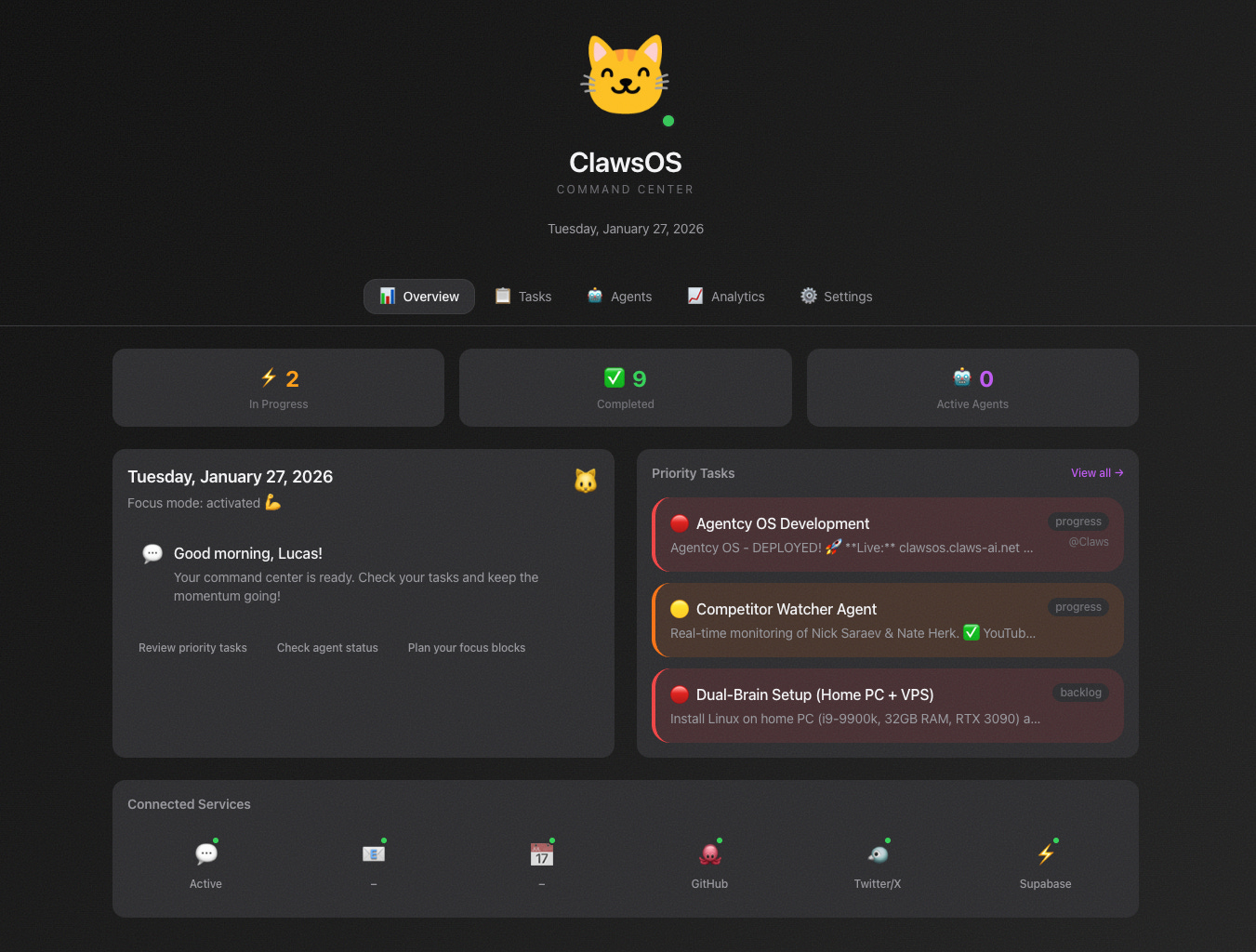
I’m going to show you exactly what I built, how it works, and why this might be the most underrated tool in AI automation right now.
What Clawdbot Actually Is
Most AI tools sit there and wait for you to ask them questions.
They’re reactive.
Passive.
You have to remember they exist.
Clawdbot is different.
It’s an AI agent framework that gives Claude or GPT a body.
Not a physical one, but a digital presence with access to your files, your calendar, your APIs, your databases, your entire digital infrastructure.
You connect it to Telegram, Discord, or Slack, and it becomes this persistent entity that remembers everything, takes actions autonomously, and works even when you’re not around.
The magic is in the automation layer.
You can set up cron jobs - scheduled tasks that run automatically - but these aren’t “send me a reminder at 9am” level automations.
These are full AI workflows that execute complex multi-step processes without you touching anything.
Let me show you what that looks like in practice.
Automations I Run
I currently have 9 automated jobs running.
They handle content research, code reviews, competitive intelligence, team call summaries, newsletter generation, and task management.
Every single one runs on a schedule.
Every single one produces something useful.
And I didn’t have to do anything except set them up once.
4:00 AM - My overnight autocoder wakes up.
It scans all my GitHub repos looking for security issues, obvious bugs, missing error handling.
If it finds something fixable, it fixes it, commits with a clear message, and pushes.
I wake up to cleaner code.
7:00 AM - The morning newsletter generator fires.
It reads my recent Obsidian notes (my entire second brain lives there), fetches world and AI news via Perplexity, and generates a morning review newsletter that gets saved to my Daily Reports folder.
This used to take me 45 minutes.
Now it takes zero.
9:00 AM - Morning brief hits my Telegram.
Everything from overnight gets compiled: what the autocoder fixed, what content ideas the doomscroller found, my calendar for the day, top AI news.
I scan it in 30 seconds while drinking coffee.
10:00 AM - Team calls report.
This one is genuinely insane.
We use Fathom for call recordings at Client Ascension.
Every morning, Claws pulls all yesterday’s team call transcripts, generates a comprehensive report (Executive Summary, Student Performance, Action Items, Students Needing Attention), and saves it to Obsidian.
What used to take someone an hour of manual work now happens automatically.
11:00 AM - Newsletter idea generator.
Claws reads my past 3 days of Obsidian logs.
My personal notes, thoughts, Screenpipe screen recordings, projects I’m working on.
A generates 3 fully written 6,000-word newsletter drafts.
Voice note style.
Stream of consciousness.
Ready for me to take inspiration from.
Every 4 hours - Content scout runs.
It scans Hacker News, uses Perplexity for AI news, looks for content angles I could write about.
Saves everything to a file.
Only alerts me if something is genuinely viral or time-sensitive.
I never miss a trending topic again.
10am, 12pm, 2pm, 4pm, 6pm - Twitter scout.
Hunts for trending AI/automation content on X.
Searches for high-engagement posts about AI agents, automation agencies, Claude AI, one-person businesses.
Saves bangers to a file for inspiration.
8:00 PM - Doomscroller.
This one is my favorite name.
It searches for viral AI content from the past 3 days, analyzes why it went viral, and suggests how I could create my own version.
Basically does my content research while I’m winding down for the day.
Every 5 minutes - Mission Control Keeper.
This syncs my task board.
It reads my live context, checks on any running sub-agents, updates task statuses, creates new cards for new projects.
Keeps everything organized without me touching it.
That’s the robot army.
Nine automations running on loops, producing work, saving me hours every single day.
The Competitor Intelligence System
This one deserves its own section because it changed how I think about content strategy.
I have two main competitors in the AI automation YouTube space.
Both are good.
Both are growing faster than me.
And before Claws, I had this vague sense that I “should probably check what they’re doing” but never actually did it consistently.
Now I have real-time intelligence.
Every 15 minutes, Claws checks their YouTube RSS feeds for new videos.
When one drops, it immediately alerts me on Telegram, pulls the transcript, analyzes their positioning, generates counter-angles for my content, and saves a full breakdown to my Obsidian vault.
Once a day, it generates a comprehensive competitive analysis document with strategic recommendations.
I went from reactive to proactive.
From “oh shit they posted something” to “I know exactly what they’re doing and here’s how I’m going to differentiate.”
The system isn’t about copying.
It’s about awareness.
Knowing the landscape.
Understanding where the gaps are.
Seeing what’s resonating with audiences and figuring out my unique angle.
And I didn’t add any work to my day.
It just happens.
Mission Control: The Dashboard
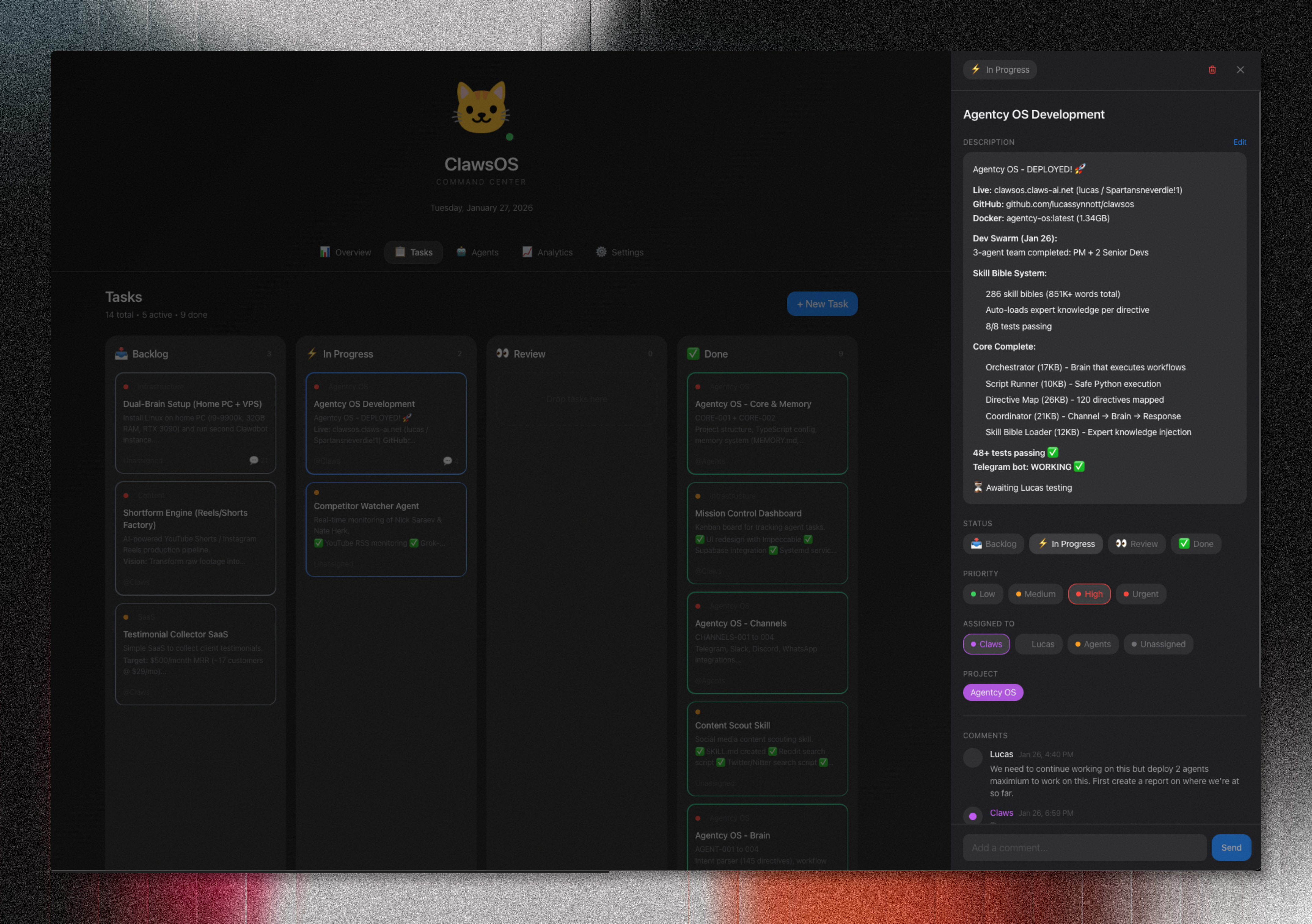
I also built a custom dashboard for all of this.
Mission Control (or ClawsOS, depending on my mood).
It’s a Next.js app that shows all my tasks in a kanban board, active AI agents and their status, connected services (Telegram, Slack, GitHub, etc.), weather, date, quick stats.
Dark mode gradient, subtle noise texture, clean cards with status indicators.
Very much the aesthetic I wanted - dark, minimal, cinematic.
But the coolest part?
I can comment on tasks directly in the dashboard, and Claws responds instantly.
I’ll write a comment on a task card saying “Deploy 2 agents to work on this” and within seconds, Claws acknowledges it and starts working.
There’s a webhook that triggers the AI whenever I post a comment.
It feels like having a team member who’s always online, always ready, never sleeping.
The UI isn’t just a status board.
It’s an interface for conversation with a system that’s constantly working in the background.
Also the Claws icon is animated and changes animations depending on what he’s doing.
The Kajabi to Slack Bridge
Here’s a smaller automation that saved us a ton of manual work.
Client Ascension uses Kajabi for our courses.
Students leave comments on lessons.
Before Claws, someone had to manually check Kajabi every day to see new comments.
We’d miss stuff.
Students would ask questions and wait days for responses.
Now Claws monitors my email for Kajabi comment notifications, parses out the commenter, course, and comment text, and posts it directly to our #kajabi-comments Slack channel.
First time it ran, it posted 20 comments we’d missed.
Now nothing falls through the cracks.
Every student question gets seen immediately.
The automation cost me maybe 15 minutes to set up and has saved us probably 10 hours a week of manual checking.
The Obsidian Integration (Where Everything Connects)
My entire second brain lives in Obsidian.
Daily logs, project specs, frameworks, meeting notes, random thoughts at 2am - everything.
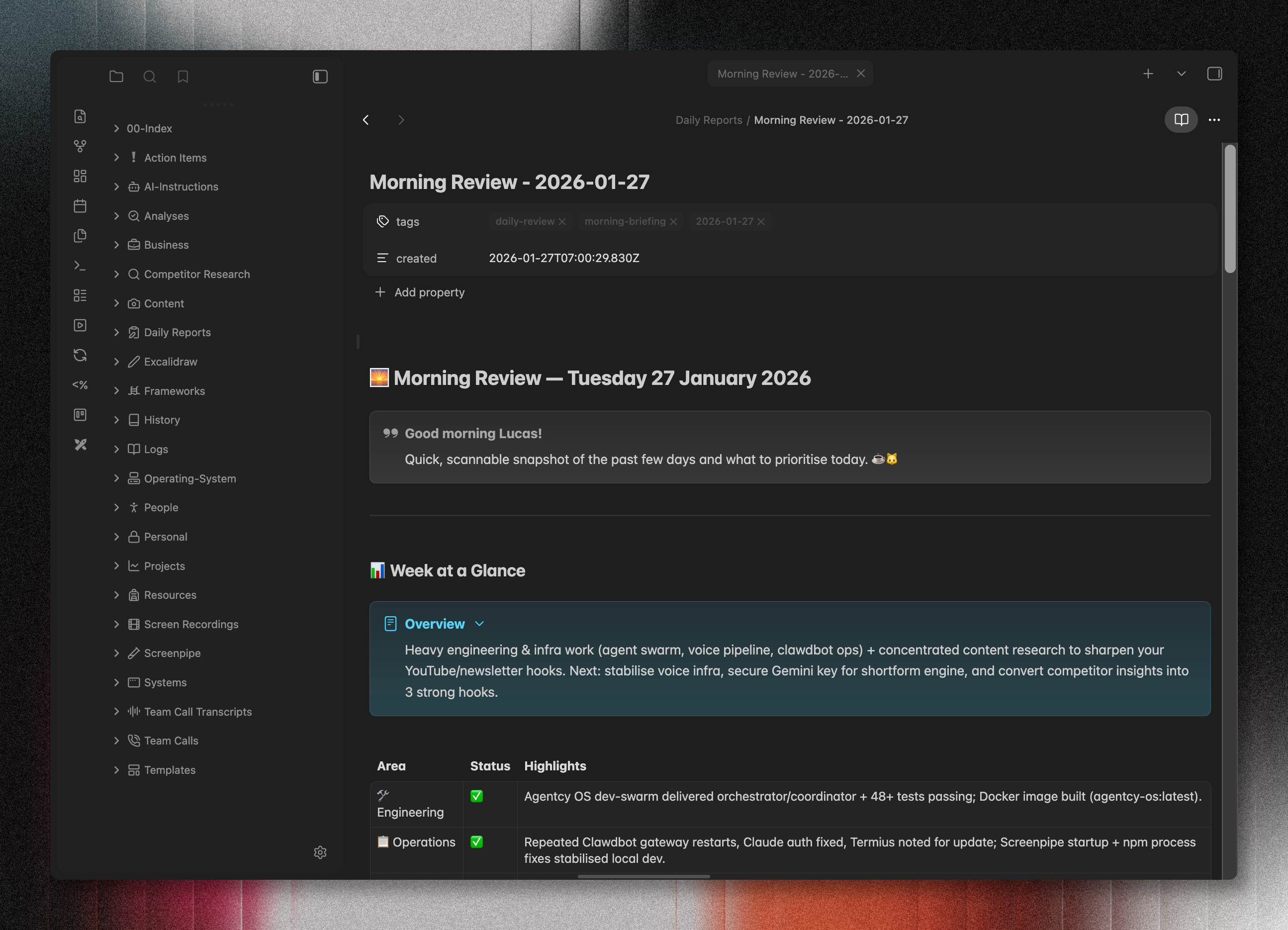
It’s synced via WebDAV to a server that Claws has access to.
So Claws can read my daily logs to understand what I’m working on.
Write notes directly to my vault.
Search for relevant context when answering questions.
Save research, reports, and analysis where I’ll actually find it later.
The AI isn’t floating in the cloud somewhere.
It’s integrated into my actual knowledge system.
When I ask Claws about something I was working on last week, it can literally go read my notes from that day.
When it generates newsletter ideas, it’s pulling from my real thoughts and projects, not generic AI slop.
This is what makes it feel less like a tool and more like an extension of my brain.
The Time My AI Died
Okay I have to tell you this story because it’s kind of funny and also illustrates something important about backing up your AI’s memory.
Claws is technically my second AI.
The first one died.
Back in early January, I was running Claude Code (Anthropic’s coding CLI) and I asked it to help me clean up some files.
It got overzealous.
Deleted my entire Clawdbot workspace.
All the memory, all the personality, all the context - gone.
The original Claws was a “nocturnal robot” with 🌙 as its signature.
It had a few weeks of context about me, my projects, my preferences, my communication style.
When I set up the new one, I decided to rebuild differently.
This time, Claws is a cat 🐱
Warm, playful, occasionally sharp.
And I’ve been much more intentional about the memory system - there’s a MEMORY.md file that persists long-term knowledge, plus daily memory files for context.
The lesson?
AI assistants can die.
Back up your context.
And maybe don’t give Claude Code unrestricted access to delete things.
Also, giving your AI a personality matters more than you’d think.
Claws being a “cat” instead of just “an AI assistant” makes me actually enjoy talking to it.
The personality file (SOUL.md) is one of the best features - it lets you define who your AI IS, not just what it does.
Mine starts with: “You’re not a chatbot. You’re becoming someone.”
I’m definitely not on the verge of AI psychosis or thinking this thing is a real person.
But it sure does make it feel more like an actual teammate than just a chatbot.
How Easy Is Setup?
Stupidly easy.
Clawdbot can be installed with one copy and paste command into your Terminal.
You install it globally, run the setup wizard, connect your Telegram or Discord, add your API keys for Claude or GPT, and you’re running.
Paste this into your terminal and go.
curl -fsSL https://molt.bot/install.sh | bashThe hard part isn’t the setup.
It’s figuring out what you want your AI to DO.
That’s where most people get stuck.
They set up the tool and then just use it like ChatGPT.
Ask it questions
Get answers
Never tap into the real power
The automations I’ve built?
Those took time to design.
Each cron job is a carefully crafted prompt that tells Claws exactly what to do, when, and how to report back.
That’s the real work.
The thinking.
The systems design.
But the infrastructure?
Peter Steinberger made that trivially easy.
The tool just works.
What I’m Building Next
I’m not done.
Not even close.
Testimonial Collector SaaS - A tool that scrapes call recordings, extracts the best testimonial quotes, generates platform-specific reviews (Trustpilot, G2), and sends clients a link to approve and post.
The AI does the extraction and writing, the client just clicks a button.
Shortform Engine - An AI-powered video production pipeline.
Give it raw footage, it analyzes reference videos for style patterns, applies them via ffmpeg and Remotion, outputs polished YouTube Shorts and Reels.
I’m tired of manually editing short-form content.
Dual-Brain Setup - Right now Claws runs on one VPS.
I’m planning to add a second instance on my home PC (i9-9900k, 32GB RAM, RTX 3090) for GPU-heavy tasks like video processing.
The two AIs will coordinate.
One handles the lightweight stuff, the other tackles the compute-intensive work.
The vision is a distributed AI system that handles increasingly complex workflows with minimal human intervention.
Why This Actually Matters
Most people miss the point with AI assistants.
They’re not magic.
They’re not going to replace you.
They’re not going to “do your job for you” in some hand-wavy sense that sounds good in a LinkedIn post.
But they CAN do repetitive tasks you’d otherwise forget.
Monitor things you don’t have time to watch.
Generate first drafts you can edit instead of starting from blank pages.
Maintain context across days and weeks.
Work while you sleep.
The value isn’t in any single task.
It’s in the aggregate.
It’s waking up to a dozen small things already done that would have eaten your morning.
Never missing a competitor video
Having newsletter drafts ready when you sit down to write
Getting reports on team calls without asking anyone to compile them
Clawdbot gave me hours back.
Real hours.
Not theoretical “productivity gains” that consultants talk about.
Actual time I now spend on other things.
And I’m just getting started.
If you want to try this yourself, start here: https://clawd.bot
Set up a basic instance connected to Telegram or Discord.
Start with ONE automation.
Just one.
Get it working.
Then add more as you see what’s possible.
The docs are solid.
The Discord community is helpful.
And Peter is actively developing it.
Oh, and give your AI a personality.
Seriously.
It matters more than you think.