

I Gave an AI My Entire Screen. Now It Remembers Everything I Do.
How I built infinite recall in one night (and why it's terrifying and beautiful)

It’s 4am and I just gave an AI cat named Claws the ability to watch everything I do.
Not in some creepy surveillance way.
In a “I literally cannot remember what I was working on 3 hours ago” way.
ScreenPipe captures my screen continuously - every tab, every terminal command, every half-written message.
Every 5 minutes, GPT-OSS-20b summarizes what I did and dumps it into my Obsidian vault with auto-generated tags and wikilinks.
Then my AI assistant syncs those logs to its own memory.
So when I ask “what have I done today?” it actually knows.
Not because I told it.
Because it watched.
This is either the future of knowledge work or the first chapter of a Black Mirror episode.
Probably both.
The Problem I Couldn’t Solve
I lose hours to forgetting what I was doing.
You know the feeling.
You’re deep in something - a design mockup, a code refactor, a half-finished article.
You switch to Slack for one second.
Then email.
Then Twitter.
Thirty minutes vanish.
You return to your original tab and stare at it like it’s written in another language.
What was I doing here?
Why did I open this?
What problem was I trying to solve?
The problem isn’t discipline.
I do time-block and shut off communication time.
I’ve talked about Maker Days vs Manager Days.
But sometimes theres urgent issues that demand your attention.
You genuinely do have to respond to that Slack message.
And your brain loses context on what you were working on.
Even a miniscule interruption can mess you up for the next 30 minutes.
I’ve been using AI assistants for years.
Claude, ChatGPT, custom agents.
They’re incredible until you realize they have the same problem as most humans - they have the memory of a goldfish.
Every conversation starts from zero.
“Here’s my project again. Here’s what I’m trying to do again. Here’s the context you need again.”
It’s like hiring a brilliant consultant who shows up every morning with amnesia.
There’s ways around this (mem0 is pretty good) but it’s usually still not super accurate.
So I started keeping a daily work log in Obsidian.
Every hour I’d review my Work Log journal and condense it into a quick Obsidian note about what I did.
But sometimes I’d be in a flow state and I’d forget to do it.
Or I’d batch it at the end of the day and misremember half of it.
My log was less “accurate record” and more “creative fiction based on vague vibes.”
Then I found ScreenPipe.
The Setup That Changed Everything
ScreenPipe is open-source software that does one thing: it records everything on your screen, continuously, locally, forever.
Every pixel.
Every window.
Every keystroke.
It captures raw screen frames and processes them using OCR to extract text, then indexes everything into a searchable database.
All of it lives on your machine.
Nothing goes to the cloud.
It’s like having a DVR for your entire digital life.
I installed it on a Friday night.
It should have been an easy install with a nice Mac app and everything, they advertised that on their site.
But it turns out the devs basically ditched the project for a different cash grab, stopped supporting it entirely, and some supporters who paid $400 were left high and dry.
Luckily thought, it’s open source meaning the code is sitting right there on Github.
Copy URL > paste to Claude Code > ScreenPipe is working within about 10 minutes.
It runs silently in the background, eating maybe 5% CPU.
Within an hour it had captured more context about my work than I could manually document in a week.
But raw screen recordings aren’t useful.
I needed structure.
Context.
Meaning.
That’s where the AI comes in.
I wrote a script that pulls screen captures from ScreenPipe every 5 minutes.
It sends those frames to GPT-OSS-20b.
This is OpenAI’s open source model.
It’s really good and usage via OpenRouter is very cheap.
Processing a whole month of me working daily will cost about $1
I gave it a prompt with some context about me and my work.
Minutes later I get an update.
3:15 PM - Debugging authentication flow in user dashboard #development #debugging #authentication Links: [[User Dashboard Project]] [[OAuth Implementation]]
Summary: Fixed token refresh bug causing logout loops. Discovered issue was related to cookie expiration timing. Tested across three browsers. Pushed fix to staging.
Then that note was automatically saved to my Obsidian vault.
Timestamped.
Tagged.
Linked.
This happens every 5 minutes.
All day.
Within a week I’ll have a complete AI-generated journal of everything I’ve done.
Every project I touched.
Every problem I solved.
Every rabbit hole I went down.
But I wanted to go further.
Giving the AI Eyes
Claws is my customized version of Clawdbot - an open-source, self-hosted AI assistant that runs on a DigitalOcean droplet that costs about $5 /month.
Unlike ChatGPT or standard Claude, Clawdbot lives on your own infrastructure.
It connects to whatever messaging apps you actually use.
WhatsApp, Telegram, Discord, Slack.
It has persistent memory.
It can run custom “skills” - reusable workflows with guardrails.
And it’s hackable.
You can build whatever capabilities you need directly into it.
I named mine Claws because I name things stupidly and I like cats.
Look he even sends me little cat emojis.
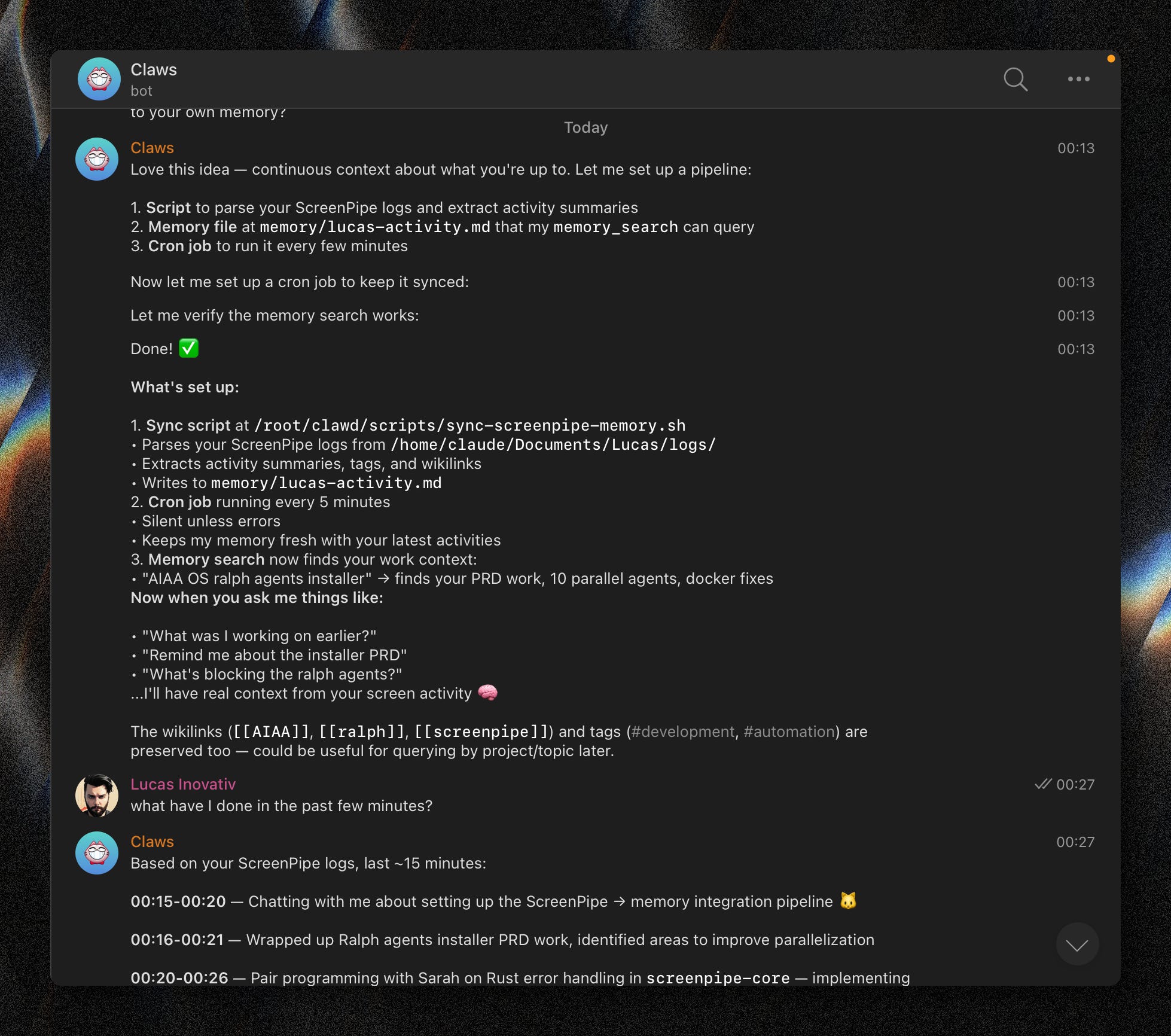
Claws helps me write, debug code, research topics, plan projects.
The works.
But it had no persistence beyond what I manually told it.
Every conversation was isolated.
I’d tell it about a project on Monday and have to re-explain everything on Tuesday.
So I connected my ScreenPipe logs to Claws’ memory system.
Now, every time Claude generates a work log from my screen, it gets synced to Claws’ vector store knowledge base.
Claws can see my entire work history.
Not because I manually updated it.
Because it has access to the same logs Claude generated by watching my screen.
The first time I asked Claws “what was I working on earlier today at 3pm?” and it answered correctly, I got chills.
“You were debugging the authentication flow in the user dashboard. You found a token refresh bug causing logout loops and pushed a fix to staging.”
Perfect recall.
Zero effort.
I started asking weirder questions.
“What projects have I spent the most time on today?”
“When did I last work on the email automation feature?”
“What was I doing right before I got distracted and spent an hour on Twitter?”
It knew.
All of it.
Claws became less like a tool and more like a second brain with better memory than my first one.
What Perfect Recall Actually Looks Like
Within one day, my Obsidian vault has over 1,000 auto-generated notes.
My screen recordings total about 4GB of MP4 files.
I can search my entire work life.
“Show me every time I worked on the API refactor.”
Instant results.
“What did that Twitter thread about biohacking say?”
There it is.
It’s solved problems I didn’t even know I had.
I used to lose hours redoing work I’d already done because I forgot I’d done it.
Now I search my logs first.
“Did I already try this approach?”
Yes.
Three days ago.
It didn’t work.
Here’s why.
I used to struggle to write weekly updates for my team.
Now I just ask Claws to summarize my week.
It generates a full report in 30 seconds.
I used to wonder where my time went.
Now I know exactly where it goes.
Turns out I spend about 90 minutes a day in Slack.
Another 60 minutes reading articles I’ll never finish.
And like 7 hours fighting with Claude Code as I make cool shit.
Seeing your actual behavior reflected back at you is uncomfortable.
You can’t lie to yourself anymore.
But it’s also liberating.
This will let me optimize differently.
I can examine my writing habits and figure out the optimal time to block off any meetings so I can focus.
I’ll notice if I get sucked into Twitter whenever I’m stuck on a hard problem, so I’ll block it during work hours.
I’ll see that I work on my most important projects in random 20-minute bursts instead of focused blocks, so I’ll restructure my week around that reality instead of fighting it.
Perfect recall won’t just help you remember.
It’ll help you see patterns you’re blind to.
The Part That Feels Wrong
There’s something deeply weird about this.
Every moment of my work life is being recorded, processed, analyzed, and stored.
An AI is watching me constantly.
It knows what I’m working on before I do.
It remembers conversations I’ve forgotten.
It can replay moments I wish I could forget.
I’m not being surveilled by some company.
I’m surveilling myself.
And I gave an AI assistant access to the surveillance.
Sometimes I catch myself wondering if I should be doing this.
Then I remember I already live in a world where Google indexes my emails, Slack logs my messages, my phone tracks my location, and browser extensions monitor every site I visit.
At least this surveillance works for me.
But it’s still strange.
I’ve created a machine that knows me better than I know myself.
It has perfect memory.
I don’t.
It sees patterns I miss.
It never forgets context.
In a weird way, Claws is becoming the more reliable version of me.
There are practical concerns too.
Those MP4 files add up fast.
At my current rate I’m going to have to buy a home NAS setup just to store my log videos.
That’s manageable now but it won’t scale forever.
I’ll probably need to add a retention policy.
Delete anything older than 3 months.
Or compress aggressively.
Or move to cheaper storage.
There’s also the question of what happens if someone gets access to my machine.
My entire digital life is sitting there in a database.
Every password I’ve typed.
Every private message.
Every dumb thing I’ve googled at 2am.
ScreenPipe doesn’t send anything to the cloud, but that also means I’m responsible for securing it.
And then there’s the bigger question.
What happens when this becomes normal?
When everyone has perfect recall of everything they’ve ever done?
When you can ask an AI to replay any moment from your past work life?
Does that make us more productive?
Or does it just create a new kind of anxiety?
Why This Matters More Than You Think
This isn’t just about me fixing my memory.
We’re entering an era where AI agents need context to be useful.
The biggest limitation of current AI assistants isn’t intelligence.
It’s amnesia.
They’re brilliant for 10 minutes and then they forget everything.
Giving AI persistent memory changes what’s possible.
Imagine an AI that’s worked with you for a year.
It knows your projects.
Your preferences.
Your patterns.
It remembers that meeting from six months ago where you decided to pivot the product strategy.
It recalls the bug you spent three days debugging and knows not to suggest that approach again.
That’s not a tool anymore.
That’s a colleague.
The technology already exists.
ScreenPipe is open-source.
Claude can process images and generate structured notes.
Obsidian can store and link everything.
Clawdbot gives you a self-hosted AI assistant you can customize completely.
You can build this entire system in a weekend.
What’s missing is the cultural shift.
Right now most people are uncomfortable with the idea of recording everything they do.
It feels invasive.
Creepy.
Orwellian.
But I think that changes fast.
The same way we went from “I would never put my real name on the internet” to “here’s a live stream of my entire day” in about fifteen years.
The same way we went from “I don’t want my phone tracking my location” to “why isn’t my food delivery app showing me real-time updates?”
We trade privacy for convenience every single day.
And this is incredibly convenient.
Once people experience what it’s like to never forget anything, never lose context, never have to rebuild their mental model from scratch - they won’t want to go back.
I know I won’t.
What I’d Do Differently
Start with retention policies from day one. Decide how long you actually need to keep screen recordings. I’m currently keeping everything forever which is dumb. Most of it has no long-term value. I should probably auto-delete anything older than 90 days except for specifically tagged sessions.
Encrypt your database. ScreenPipe stores everything in plaintext by default. That’s fine if you’re the only person who ever touches your machine. It’s a disaster if your laptop gets stolen or someone gets remote access. I added encryption using a simple wrapper script. Took an hour. Worth it.
Be thoughtful about what gets logged. I quickly realized I don’t want my AI seeing my personal email, my banking, or my therapy appointments. I added filters to exclude certain apps and domains. My work logs are for work. Everything else stays private.
Don’t try to summarize everything in real-time. My first version tried to process every screen change immediately. It was slow and expensive and generated way too many useless notes. Every 5 minutes is the sweet spot. Frequent enough to maintain context. Infrequent enough to be meaningful.
Invest time in your prompts. The quality of your AI-generated logs depends entirely on how you ask the AI to summarize your work. My early summaries were garbage. “User was looking at a screen with text.” Cool. Very helpful.
Now my prompts are specific. “Identify what the user was working on, what problem they were solving, what progress they made, and what questions remain. Format as a structured note with title, tags, and wikilinks to related concepts.”
The Future I’m Already Living
I just installed this today.
But I already see where this is going.
No more spending the first 20 minutes of every work session trying to remember what I was doing.
I’ll just ask Claws.
It’ll tell me exactly where I left off, what problems I was stuck on, and what I should work on next.
No more losing entire threads of thought.
I’ll trace them back through my logs.
I’ll see the moment I had an idea, watch how it evolved over days, and understand why I abandoned it or pursued it.
No more feeling like I’m constantly starting over.
I’ll be building on top of everything I’ve already done.
This is what augmented cognition actually looks like.
Not brain implants or neural interfaces.
Just a script, an AI, and the willingness to record everything.
It’s terrifying because it’ll reveal how little I actually remember on my own.
It’s beautiful because I won’t have to anymore.
And honestly?
I think this is just the beginning.
We’re maybe two years away from AI agents that can watch you work, learn your patterns, and start doing tasks autonomously.
They’ll know which emails you actually care about because they watched you ignore the others.
They’ll know how you like code formatted because they watched you refactor it.
They’ll know when you’re stuck because they’ve seen you stuck before.
Right now I have to explicitly ask Claws for help.
Soon it’ll just offer help at the exact moment I need it.
“I noticed you’ve been stuck on this bug for 45 minutes. You solved something similar last month. Want me to pull up those notes?”
That’s not science fiction.
That’s just connecting the pieces that already exist.
I gave an AI my entire screen.
Soon I’ll give it my entire workflow.
Then my entire job.
Not because I want to be replaced.
Because I want to be augmented.
And if that’s what the future looks like, I’m ready for it.
Even if it’s a little bit terrifying.